
Introducing DiskWright for Mac

Make room for
what comes next.

Your next project deserves the space.
See what’s filling your Mac. Know what it is. Choose what goes.

Native macOS 14+ · Apple silicon & Intel · No subscription

BUILT FOR A CLOSER LOOKFind. Inspect. Decide.
DiskWright native Mac interface showing a nested storage treemap and ranked file inspector with sample data

App interface with sample data.

Take it for a spin
◉ Your files stay on your Mac✓ Review before moving to Trash⌘ Built to feel at home

A LITTLE CLARITY GOES A LONG WAY

Your disk has a story.
See the whole picture.

Old exports. Growing build folders. That archive you forgot.
Find the space hiding in plain sight.

01 / EXPLORE

Eight views.
One very clear answer.

Follow a folder, read a sunburst, or connect the dots in a mind map. Choose the view that makes your storage make sense.

TreemapFoldersSunburstFlameBubblesMind MapTop SizesAge Map
02 / UNDERSTAND

Big file?
Get the full picture.

Logical size and size on disk, side by side. Largest items ranked underneath. Peek with Quick Look or jump straight to Finder.

Logical size12.4 GB
Size on disk8.2 GB
Illustrative values. A size difference isn’t guaranteed reclaimable space.
03 / STAY IN CONTROL

You make the call.
Every single time.

Stage a file. Review its full path. Confirm Move to Trash. Protected locations are excluded, and DiskWright never empties Trash for you.

How cleanup works ↗

LESS EXPLAINING. MORE EXPLORING.

Go on. Click around.

Open a folder, switch views, stage a sample.
Fictional data. Your Mac stays untouched.

ExploreHome
Nothing staged. You decide what goes.
DiskWright Mind Map showing expandable folder branches with fictional project files
Another way to connect the dots. Native Mind Map · app interface with sample data.

SPACE, WITHOUT THE SECOND-GUESSING

Curiosity first.
Cleanup second.

A good disk utility should give you answers.
And leave the decisions to you.

  1. 01

    Find what’s taking up space.

    Scan your Mac, a folder or a mounted drive. Follow the largest items until you reach the actual file.

  2. 02

    Make sure it’s what you think.

    Inspect sizes and dates, preview with Quick Look, or reveal it in Finder. Choose which duplicate copy to keep.

  3. 03

    Review. Then move to Trash.

    Nothing goes on its own. Review the full cleanup list before confirming. Changed or inaccessible items are reported.

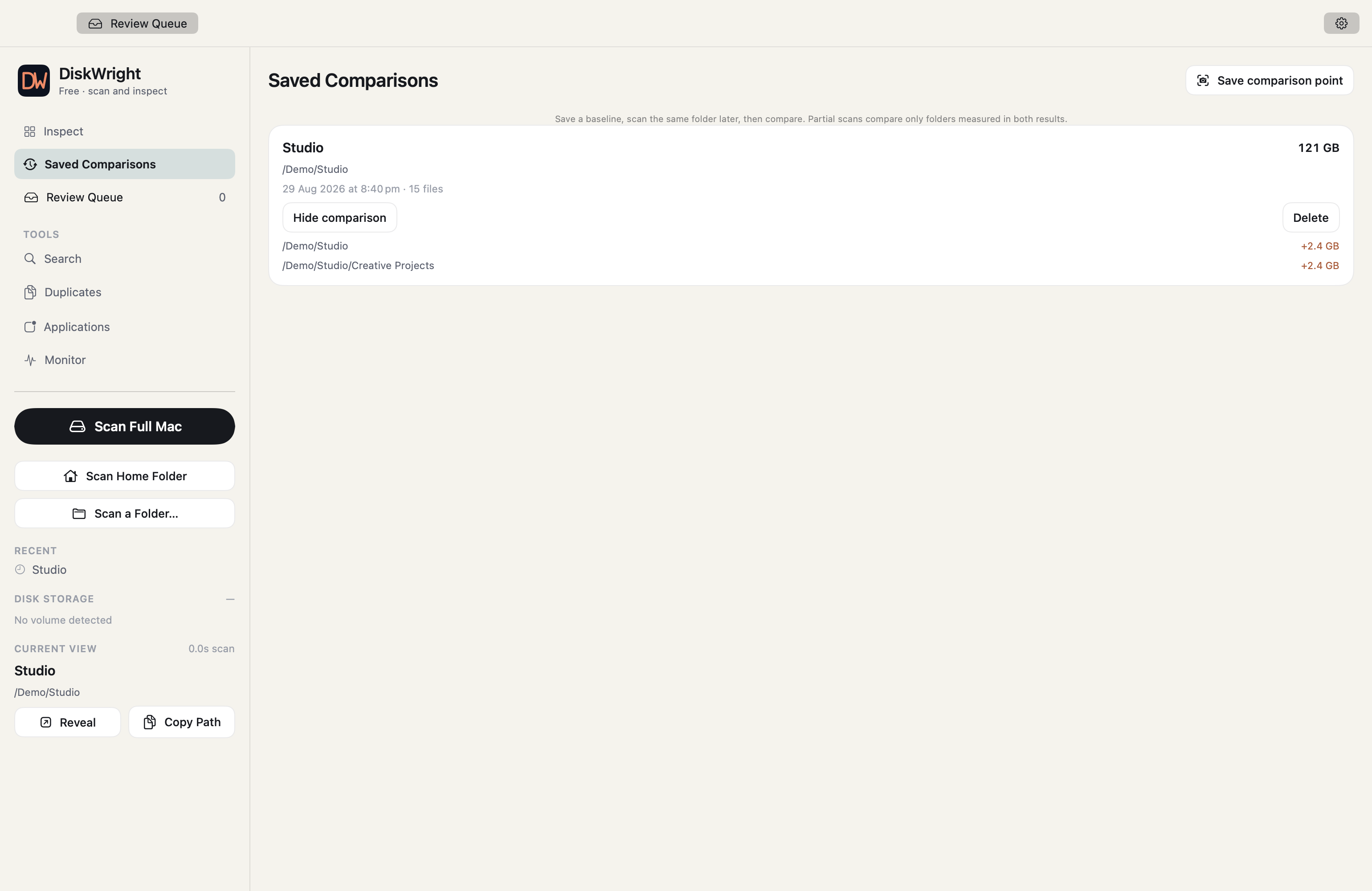
COMPARE

“What grew?”
Now you can see.

Save scan measurements and compare them later. Find which folders changed when your drive starts filling up again.

MONITOR

A window into
your working Mac.

Keep free space, CPU, memory and available process activity in view. See the apps doing the work while you investigate.

PRIVATE BY DESIGN

Your files.
Your business.

Scanning and duplicate matching happen locally. Your scan history stays on your Mac. License keys verify offline.

Read about privacy ↗

GOOD TO YOUR MAC. EASY ON YOUR WALLET.

Buy once.
Make room for more.

No subscription to manage.
No recurring charge to forget.

A THOUGHTFUL TOOLKIT

Start with the whole picture.

The 14-day trial includes the paid features. Exploration stays free afterward.

  • Eight ways to explore your storage
  • File inspection and largest items
  • Duplicate discovery and monitoring
  • Local scanning and offline keys

PLANNED LAUNCH PRICE

US$19once

Personal license · one Mac

We’re completing release checks.
No payments are being taken.

Before you make room

Good questions.
Straight answers.

Will it delete anything on its own?

No. You stage items, review their full paths and confirm Move to Trash. Protected locations are excluded. DiskWright never empties Trash for you.

Why are the two size numbers different?

Logical size describes the file’s contents. Size on disk reports allocated storage where macOS provides it. Sparse files, compression and cloud-only files can make them differ. That difference is not a promise of space you can recover.

Can I scan an external drive or a folder?

Choose your Mac, home folder, a specific folder or a mounted volume. Access depends on macOS permissions and the volume. Unreadable paths are reported so you know when coverage is incomplete.

Do my files leave my Mac?

Scanning, hashing and duplicate matching happen locally. Scan history stays on your Mac. Purchasing uses payment and email providers; your scan data is not part of checkout.

What happens after the trial?

The 14-day trial includes the paid features. Afterward, exploration, eight views, inspection, duplicate discovery and monitoring remain free. A personal license unlocks cleanup, app removal and saved comparisons.

Does moving something to Trash free space immediately?

Usually you need to empty Trash in Finder first. Snapshots and shared storage can also affect what macOS reports. DiskWright shows live drive capacity separately from the size of staged items.

YOUR NEXT PROJECT IS WAITING

Great things
start with a little space.

DiskWright is coming soon. Explore the demo today.

Your sample cleanup

Review the full paths. This demo never accesses or changes your files.